Tenant file checklist
50059, 9887/9887-A, 4506, 92006, EIV reports and more per household, with missing or expired items flagged.
In the live demo
🏛️ HUD / project-based Section 8
Recerts, files, inspections and HAP in one place. Keep every household's file complete and every deadline visible, without the binder chaos.
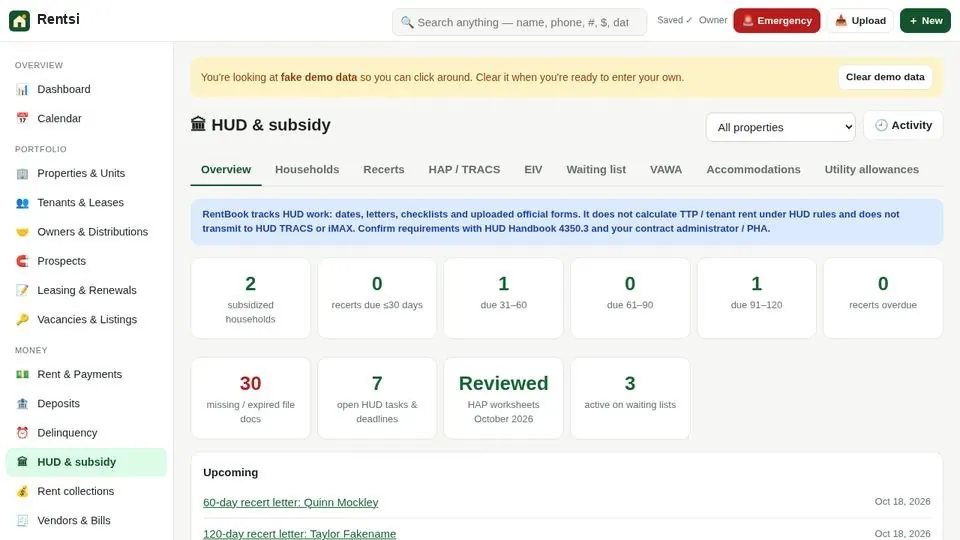
Rentsi is property management software with the HUD work built in. For project-based Section 8 and other HUD multifamily properties it keeps each household's file, recertification dates and subsidy on the same record as the lease and ledger, so the monthly HAP voucher and the next management review aren't a scramble.
It works alongside your certified TRACS software rather than replacing it: you prepare and approve the voucher worksheet in Rentsi, submit through TRACS or your contract administrator, then record the TRACS reference and match the HAP deposit. New to recerts? Read how to prepare for a HUD recertification.
The tools below are built for this kind of portfolio.
50059, 9887/9887-A, 4506, 92006, EIV reports and more per household, with missing or expired items flagged.
In the live demo
Annual and interim recerts with reminder letters at 120, 90 and 60 days, and a list of who's due or overdue.
In the live demo
Monthly worksheet per property: Draft → Reviewed → Approved by a second person → Submitted (you enter your TRACS reference) → Paid, with the HAP deposit matched and posted.
In the live demo
A place and schedule per household for EIV reports you pull from HUD's system, with follow-up tasks.
In the live demo
VAWA notices and certifications, emergency transfers, and a waiting list with preferences.
In the live demo
Tenant rent and subsidy (HAP) tracked separately on each lease.
In the live demo
Annual UA analysis, repayment agreements for unreported income, and a special-claims tracker.
In the live demo
Unit inspections with photos and checklists.
In the live demo
Recert reminder and rent-change letters filled in from the household's record, saved to their file as PDF or Word, with e-sign.
In the live demo
Recert dates, HUD tasks and accommodation deadlines show on the team calendar.
In the live demo
No. You prepare the monthly HAP voucher worksheet in Rentsi, a second person approves it, and you submit it through your certified TRACS software or contract administrator. Then you enter the TRACS reference in Rentsi and match the HAP deposit to each household.
No. You enter the tenant rent and assistance figures from the signed 50059. Rentsi then keeps the tenant portion and the subsidy on separate ledgers, each with its own balance.
Every household has annual and interim recertification dates, with reminder letters at 120, 90 and 60 days and a list of who is due or overdue. Recert dates also show on the team calendar.
Enter the new tenant rent and HAP with the effective date. Rentsi previews the back-adjustments on both ledgers before posting and drafts the rent-change letter.
No. Tenants see only their own share and balance in the tenant app.
Yes. Open the live demo with sample data and go to HUD & subsidy, or book a demo and we'll walk you through a recert and a voucher.